Posts

Logic App Standard workflow Initialize variables not working in other Actions

Image
       While working on a Logic Apps Standard workflow, I noticed that the new designer groups all Initialize Variable actions into a single block. After saving the workflow, the variable names disappeared — both inside the initialization block and in the actions that reference them.      After checking multiple articles and GitHub, it looks like this is a known Microsoft bug ( https://lnkd.in/gNQG4rTE ) the new UI.     Though it's a bug from Microsoft side, but we have an alternative solution for it. the parameters what i have used in my logic app as below highlighted. As it's a Straight string and Dynamic content , the new UI is not able to render it property Workaround:     I used concat function to combine the strings for my variable "errorDescripiton" concat('General EXCEPTION occurred in the Workflow ', workflow()?['name'],  ' inside the Logic App ',  parameters('ParamLogicAppNameAppointments'),  ' w...
Create D365 Post entity record

  var record = {}; record["regardingobjectid_contact@odata.bind"] = "/contacts(ff072662-ef61-e511-93fc-000d3ab14dd2)";   //record["regardingobjectid_new_customerregistration@odata.bind"] = "/bupa_customerregistrations(910e6373-0c2f-eb11-a813-000d3a219518)";  //for custom entity record["text"] = "Customer Registration record linked success"; // Text record["source"] = 2; // Choice record["type"] = 2; // Choice Xrm.WebApi.createRecord("post", record).then( function success(result) { var newId = result.id; console.log(newId);         alert(newId) }, function(error) {         console.log(error.message);          alert(error.message) } );

Dynamics CE/Dynamics 365 default site map missing

Image
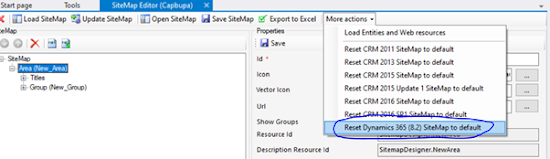
       Sometimes, the Default site map might be missing from your Dynamics CE(9+ version) online trail version. This was happened to me while I was creating my trail instance in the month of Aug-2021. Resolution:      Once we open the default site map, we can see missing modules (ex: Sales, Service and marketing). In order to get the same, go to More actions drop down and select ‘Reset Dynamics 365(8.2) SiteMap to default’ as below Now you will be able to see the default site map.

Plug in execution process in PreValidation & PreOpeation & PostOperation in D365

Image
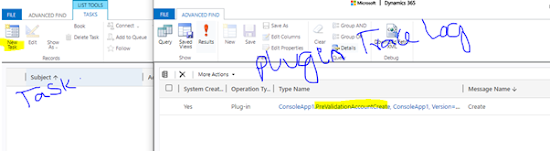
what if a plug in is registered on create message and with all the PreValidation , PreOperation and PostOperation what will happen if one got failed. Below are the use cases for reference. Account->Create PreValidationAccountCreate         Task Creation PreOperaionAccountCreate         Task Creation PostOperationAccountCrate              Task Creation Below all scenarios I  am trying to create a Task record. Scenario :1 If exception happening in PreValidationAccountCreate before any CRUD operation. Account record will not create in this case           ->PreValidationAccountCreate will trigger and will throw exception. It shows the trace log in plug in tracelog         ->PreOperationAccountCreate will not trigger, and it will not show in plug in Trace log     ...

How to get field name from previous step using expression in Power flow or Microsoft Flow

Image
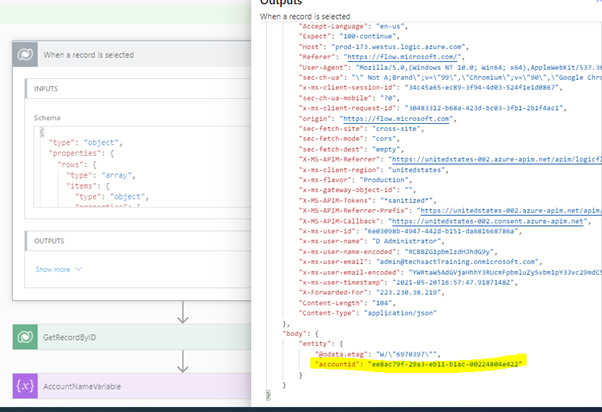
  How to get field Name from previous step by using Expression when we use GetRecordByID trigger in power flow: There is no direct option in Power flow to get all columns or selected columns when we are triggering the flow from OOB button click. Ie “When a record is selected” trigger. Output from the above trigger. Click on “Show raw output” . This option you will get once the flow was run. Below we can see only “accountid” field from in the Output window below. But we can achieve it using another way. 1.        Create a “When a record is selected” trigger 1.        Add another action “Get Record By ID” from dataverse. Here I have selected name and emailaddress1 column. 1.        Take another action “Variable”. Declare it as “AccountName”. Here I want to capture the account record “name” field using expression. For that I need to use below expression. Body(‘GetRecordByID’)[‘name’] Here...

How to call Global action using Console application

Image
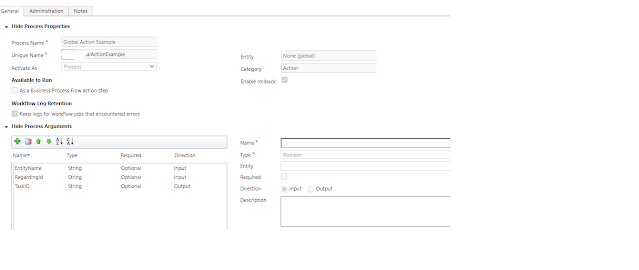
 We can Global action in any place Ex. This we can execute using Js or we can call this using a console application or we can call this action using plug in. Here it will take input arguments(if you specify in your action) and returns output variable. Action will not execute in below conditions When the action is in Draft state When the action is profiled Hence, once you move or import the solution to the higher instance make sure all the Process will be in Active state. Enough of explanation.... Now Below piece of code to call entity specific action. for establishing the connection in console you can refer this  URL The difference between Entity specific action and global action is, for entity specific action we should add Target attribute where global action it's not required. If you are not specify the Target attribute for entity specific action it will give error(Error: Target attribute is required) Defining global action: Below are two Input attributes: EntityName(Type:st...

How to call Entity specific Action using c#

 We can call Entity specific action in any place Ex. This we can execute using Js or we can call this using a console application or we can call this action using plug in. Here it will take input arguments(if you specify in your action) and returns output variable. Action will not execute in below conditions When the action is in Draft state When the action is profiled Hence, once you move or import the solution to the higher instance make sure all the Process will be in Active state. Enough of explanation.... Now Below piece of code to call entity specific action. for establishing the connection in console you can refer this URL The difference between Entity specific action and global action is, for entity specific action we should add Target attribute where global action it's not required. If you are not specify the Target attribute for entity specific action it will give error(Error: Target attribute is required) In below example we have used 2 input varibales. AccountName (type...

Connect Dynamics CE using ClientID and ClientSecret

 /*Connection establishing using ClientID & Client Secret*/ public static void GetConnection()         {             try             {                 string connectionString = "AuthType=ClientSecret; url=REPLACE WITH ORANIZATION URL; ClientId=REPLACE WITH YOUR CLIENT ID; ClientSecret=REPLACE WITH YOUR CLIENT SECRET";                 crmServiceClient = new CrmServiceClient(connectionString); //Connecting to the D-365 CDS instance                 if (crmServiceClient != null && crmServiceClient.IsReady)                 {                     Console.WriteLine("\nConnection successful.");                 }             ...

Entity & attribute metadata using c#

 Below example to get Attribute Metadata using C# for a specific entity. /*Connection establishing using ClientID & Client Secret*/ public static void GetConnection()         {             try             {                 string connectionString = "AuthType=ClientSecret; url=REPLACE WITH ORANIZATION URL; ClientId=REPLACE WITH YOUR CLIENT ID; ClientSecret=REPLACE WITH YOUR CLIENT SECRET";                 crmServiceClient = new CrmServiceClient(connectionString); //Connecting to the D-365 CDS instance                 if (crmServiceClient != null && crmServiceClient.IsReady)                 {                     Console.WriteLine("\nConnection successful.");         ...

How to get Shared variable declared in PreValidate operation in D365 plug in

  Suppose when we declared a shared variable in PreValidate operation and we are trying to get it using Context.SharedVarible[“yourKey”] in PreOperation and PostOperation. It will give error as below.   The given key was not present on the dictionary.   We need to read it using below syntax in both preOperation & PostOperation   Var myVariable = context.ParentContext.SharedVariables["MyVariable"].ToString()

PreValidate plug in example

Image
PreValidation plug in example: One of the most common interview question that never forgotten by any one and of course in Realtime this will rarely used. When we want to get no of child records when we are deleting the main/parent record then we can use PreValidation stage to get the count.   As some one thinks at very first time, why can’t we get the count in PreOperation stage. Because this will be in the same execution and we will not get the record count and by the stage it reaches to 20(PreOperation) all the child records gets deleted as per the relationship behavior.   So we need to register our plug in in PreValidaton. Below is the sample example to get the count of child records when we register the plug in in Delete message.   if (context.InputParameters.Contains("Target") && context.InputParameters["Target"] is EntityReference)             {        ...

Disabling the Lookup View Picker in D365 UCI using Java Script

In previous version of CRM disableViewPciker=1 is working , now it is deprecated in UCI and will not work any more. Below is the syntax to achieve it. var lookupParameters = {};        var viewIdList = [ "View GUID 1" , " View GUID 2" , "View GUID 3" ] //Here you can give atleast one view ID        lookupParameters.disableMru = true ; //Disable Most Recent Items        lookupParameters.viewIds = viewIdList;               Xrm.Utility.lookupObjects(lookupParameters).then( function (selectedItems) {              //your logic        }, null ); Here in the above code, you still be able to see “Change View” button , but when you click on it it will display only views what we have added it that array.

'The remote server returned an error: (409) Conflict

When we are dealing with Azure Storage Table data insert, we may get this kind of error. This is due to when we are trying to insert a duplicate key inside a Azure Table Storage. duplicate key= PartitionKey+RowKey Ex: PartitionKey="1001"        RowKey="John" here once we insert the above data into Azure Table, and again if we are trying to insert same combination then we will get " The remote server returned an error: (409) Conflict " error. How to resolve it:     In this case we need to go with either of below methods as per your requirement. TableOperation.InsertOrReplace(tableObject) TableOperation.InsertOrMerge(tableObject)   

Get azure blob files inside Sub Directories

In Microsoft doc's we can find code to get blob files inside a container using c#. What if Container has some Sub Directories with blob data/files. How we can replicate the folder structure in our local machine.        There might a change Container contains empty folder or a file. Below code snippet will help to create the same Azure Container structure. here i have used ASPX pages as per my requirement. we can use other applications as well. To get Azure connection string use below URL:  https://docs.microsoft.com/en-us/azure/storage/common/storage-configure-connection-string         public string storageAccountName = "azure storage account name";         public string accessKey = "your azure accesskey";         public string containerName = "myfirstblobcontainer";         public string connectiongString = "Azure connection string";         publ...

AI for Market Insights feature in Dynamics 365

Image
Now a days each IT Industry have been doing their job very much simpler by intruding automatic systems in it. Microsoft is the one who regularly introducing new changes to the existing technologies. Why Microsoft is intruding new feature in existing technologies frequently. Not at all good. Most of the people think like that only, because they need to learn it and implement as well. Don’t think like that. Every company is trying to get more and more clients by showing rich content or lot of features with in a small amount of time. So “AI for Market Insights” is an app introduced in Dynamics 365, which will helpful for marketing people to showcase a demo in an easy manner. It also shows do the sync between social media like Facebook, twitter, YouTube, Instagram. Here we will see a new feature “Market Insights” which is newly introduced in Dynamics 365. I think no need to give complete overview on how it works. You can ref...